4 min read

How LabWare Integrations Connect Your Quality Lab Systems and Instruments

December 12, 2025

How LabWare Integrations Connect Your Quality Lab Systems and Instruments
4:01

LabWare Integrations

Quality-focused labs don't just run one application. They rely on instruments, chromatography systems, MES, ERP, QMS, and reporting tools that must exchange data. The question is whether that data moves automatically and reliably, or through spreadsheets and manual retyping.

LabWare integrations are designed to put your LIMS, ELN, and broader LabWare platform at the center of this ecosystem so quality, operations, and IT teams see the same data, in context, with less friction.

Why integration is a quality requirement

In QA/QC labs, disconnected systems lead to repeated deviations, unexplained discrepancies, and lengthy investigations. Every time a result is copied from an instrument printout into a spreadsheet and then into a batch record, risk and delay increase.

Labs that prioritize instrument and system integration see faster results, fewer manual errors, and higher productivity. Integration is no longer optional; it is a core quality control capability.

What LabWare connects

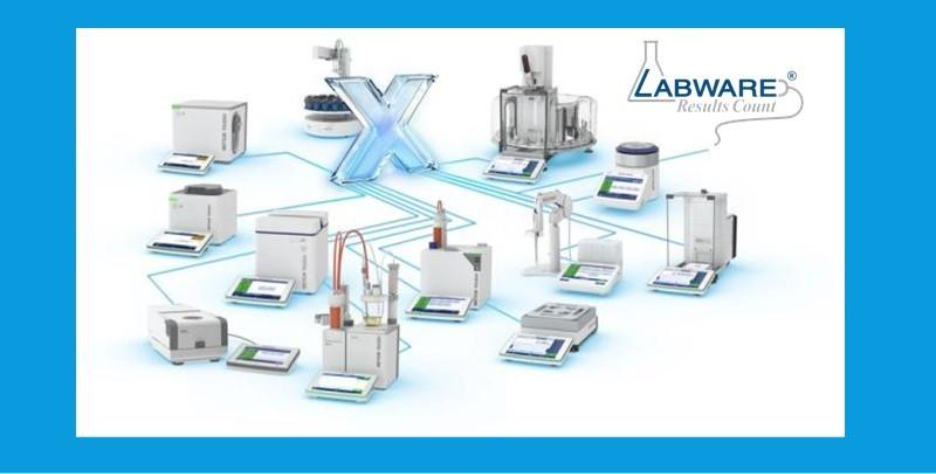
The LabWare Integration Platform gives you a structured way to connect instruments and enterprise systems without building a tangle of one-off scripts. It supports direct, file-based, and API-driven integrations using standards such as REST/JSON, MQTT, XML, ASTM, and HL7.

This enables secure, reliable data exchange between LabWare and systems including LabX, SoftMax Pro, Chromeleon, Empower, SAP ERP, and Körber PAS-X MES.

In practice, that means:

  • Instruments send results directly to LabWare, including comprehensive metadata and an audit trail.

  • MES and ERP systems receive the correct QC data, tied to batches, lots, and stability protocols.

  • ELN experiments can retrieve and reuse results without manual reconciliation.

Instead of each department owning its own partial version of the truth, LabWare provides a shared, validated data backbone.

Examples from real-world labs

Across industries, labs use LabWare integrations to:

  • Push balance and instrument data straight into LabWare, eliminating transcription and tightening compliance.

  • Keep production and QC aligned on the same material, batch, and specification data via MES–LIMS integration.

  • Bring more instruments online without exposing the lab network or weakening cybersecurity controls.

The goal is the same in each case: automate data flow while preserving data integrity and traceability.

Operational gains for QA/QC

When you connect instruments and quality systems to LabWare, day-to-day work changes in measurable ways:

  • Fewer data-entry errors and associated deviations

  • Shorter turnaround from sample receipt to release decision

  • More precise traceability from result to instrument, method, and analyst

  • Less time spent reconciling data across applications during audits and inspections

Those gains compound as you add more instruments and sites. Because integrations are built on repeatable patterns rather than custom one-offs, upgrades and multi-site rollouts become more predictable, and the resulting data flows stay structured and consistent, giving your lab a stronger foundation for AI and advanced analytics.

Where to go next

If you are planning how to modernize your quality lab environment, start by mapping the systems and instruments that touch your critical data. Then use the LabWare Integration Platform and integration-focused resources as a reference for what can be connected using proven patterns, rather than building and maintaining custom one-off integrations.

From there, you can prioritize the integrations that reduce manual work or risk, and design an integration roadmap that keeps your quality lab systems and instruments securely connected as your requirements evolve.

Talk to us

If you would like to discuss your current landscape or see how LabWare integrations could work in your lab, contact us to schedule a conversation with one of our experts.

Featured


Capterra


 Software Advice


GetApp


Slashdot


 SourceForge


New call-to-action


New call-to-action


Step by Step Guide to Purchasing LIMS